AI Career Roadmap for Working Professionals (2026)
6 real AI tools, prompts, and templates I actually use — for staying safe in an IT job, growing a small business, fixing a resume, and building an app with AI. Step-by-step.
6 real AI tools, prompts, and templates I actually use — for staying safe in an IT job, growing a small business, fixing a resume, and building an app with AI.
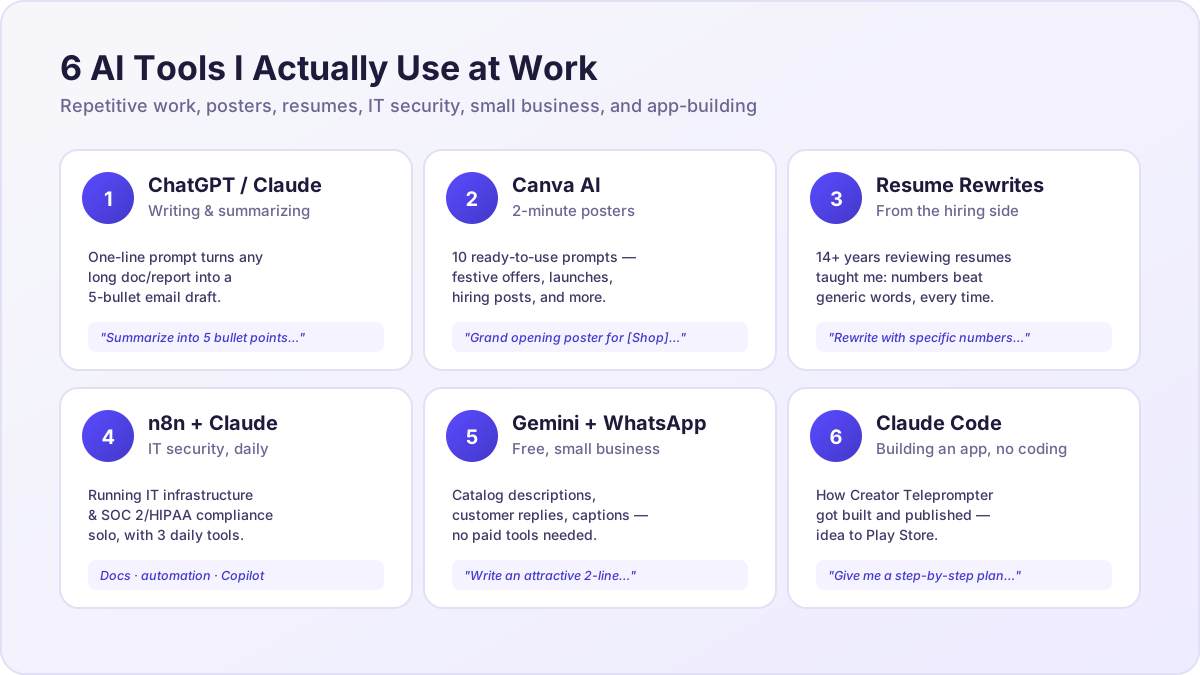
1. Five AI Tools for Repetitive Work
My experience: At Edvak Technologies, I'm the only person handling IT Infrastructure end-to-end — reports, policies, documentation, emails. Without these 5 tools, my workload would double.
- ChatGPT / Claude — Writing & Summarizing. Any long document or report, summarized or drafted into an email with a one-line prompt.
- Notion AI — Meeting Notes & Planning. Type out what was discussed in a meeting; it organizes it into action items.
- Google Gemini — Quick Research. Fast, structured answers on any topic, for free.
- Canva AI — Visual Content. Posters, presentations, social media graphics — ready in 2 minutes, no design skill needed.
- n8n — Task Automation. Set it up once and repetitive tasks (data entry, notifications, reports) run automatically.
Try this prompt:
"Summarize this [Document/Email/Report] into 5 bullet points, including the important numbers/dates."
2. 2-Minute Posters — 10 Ready-to-Use Canva AI Prompts
My experience: Most small business owners pay a designer for every poster. I do the same work in Canva AI in 2 minutes — no design skill required.
- Festive Offer Poster — "[Festival] Special Offer poster for [Shop Name], with [Discount]% off, festive colors, bold text"
- New Product Launch — "Modern poster announcing new product [Product Name], minimal design, price highlight"
- Limited Time Discount — "Urgency-style poster, 'Offer ends [date]', bold red/orange colors"
- Shop Opening Announcement — "Grand opening poster for [Shop Name], address, opening date, celebratory design"
- Testimonial / Review Highlight — "Clean quote-card poster with customer review text and 5-star rating graphic"
- Event Invitation — "Elegant invitation poster for [Event Name], date, time, venue, RSVP details"
- Weekly Menu / Price List — "Organized menu-style poster with items and prices in a grid layout"
- Festival Greeting — "Warm greeting poster for [Festival], shop name and logo placement, traditional colors"
- Hiring / Job Opening — "Professional 'We're Hiring' poster with role, requirements, contact info"
- Thank You / Milestone Post — "Celebration poster thanking customers for [milestone, e.g. 1000 customers]"
3. Resume Rewrite Prompt Template
My experience — from the other side of the hiring table: In 14+ years, I've reviewed hundreds of resumes while hiring at Cloud4c, Vitech, Solenis, Aricent, and Wipro. Most resumes list skills but never show impact — that's the single biggest mistake I see.
3 common mistakes:
- Generic words — "Hardworking," "Team Player." Every resume uses these; they don't stand out and don't prove anything.
- No numbers / impact — "Managed servers" says nothing. "Managed 50+ servers, reduced downtime by 30%" does.
- Too long — even freshers send 3–4 page resumes. A recruiter looks at a resume for about 10 seconds.
Resume bullet rewrite prompt:
"Take this bullet point from my resume and rewrite it in one line with specific numbers/impact, in a way that appeals to an IT recruiter: [Paste your original bullet here]"
Full resume review prompt:
"Review my resume for [IT Role]. Tell me where I'm using generic words, where numbers/impact are missing, and what I should cut."
4. Three AI Tools an IT Head Uses Every Day
My experience: At Edvak Technologies I handle IT Infrastructure & Security alone — AWS Cloud, FortiGate networking, identity management, SOC 2 / HIPAA compliance. It wouldn't be possible without these 3 tools.
- Claude — Documentation & Drafting. Policies, reports, emails, compliance documentation — drafted fast and accurately, every day.
- n8n — Workflow Automation. Automates repetitive tasks (alerts, data sync, notifications) to cut down manual work.
- GitHub Copilot — Coding Assistant. Speeds up scripts, automation code, and app-building work — I built the Creator Teleprompter app this way too.
5. Free AI Tools for Small Business
My experience: As an IT Security Head, I see new tools constantly. Most small business owners don't know these free ones exist, and it's putting them behind competitors who do.
- Google Gemini — Free Content Assistant. Shop catalog descriptions, customer message replies, social media captions — all with one prompt, completely free.
- WhatsApp Business + Canva AI Combo. Make catalog photos look professional in Canva AI, then post them straight to your WhatsApp Business catalog — customers see them directly.
Catalog description prompt:
"Write an attractive 2-line description for my product [Product Name] for my WhatsApp catalog, including price and special features."
6. How I Actually Built an App With AI
My story: I built Creator Teleprompter, an Android app, and published it on the Play Store — a teleprompter app for content creators with Bluetooth remote control. I built the whole thing using Claude Code. I'm not a programmer; I never wrote the code myself. If I could build an app without a coding background, you can too.
- Write your idea clearly — describe what the app should do and who it's for, in one paragraph.
- Take that idea to Claude Code — explain it in plain language; it builds the code structure.
- Start small — don't try to build every feature at once. Start with one core feature and test it.
- Test with real users — try it with friends/family and collect feedback.
- Publish to the Play Store — create a Google Play Console account and submit the app.
App idea → build prompt:
"I want to build a [App Type] app that does [Main Function], for [Target Users]. Give me a step-by-step plan to build it."
Every tool, prompt, and story in this roadmap is something I've actually used and done, as an IT Head, an app builder, and a content creator. New content goes up weekly on Instagram and YouTube — follow along for deep dives, or join the WhatsApp community for updates.
— Lovakumar
Related reading: How to Find Your YouTube Niche Using ChatGPT: 15-Minute Guide